
AI Tool Buying Checklist
Why Solo Devs Need the Right AI Code Editor in 2026

Cursor vs Windsurf vs Copilot compared for solo developers: pricing, AI model access, agentic features, and which code editor actually ships features faster in 2026.
The AI code editor market has fractured. As of May 2026, Cursor, Windsurf, and GitHub Copilot have each carved distinct strategies — Cursor betting on agentic multi-file workflows, Windsurf (by Codeium, now under OpenAI's umbrella after the 2026 acquisition) pushing deep contextual awareness, and Copilot leveraging GitHub's ecosystem dominance. For solo developers shipping production code without a team to catch mistakes, choosing wrong means paying for features you don't use or missing capabilities that save hours weekly. The price gap between these tools now ranges from free to $40/month, making the decision non-trivial for lean operators.
Quick Comparison Table: Cursor vs Windsurf vs Copilot
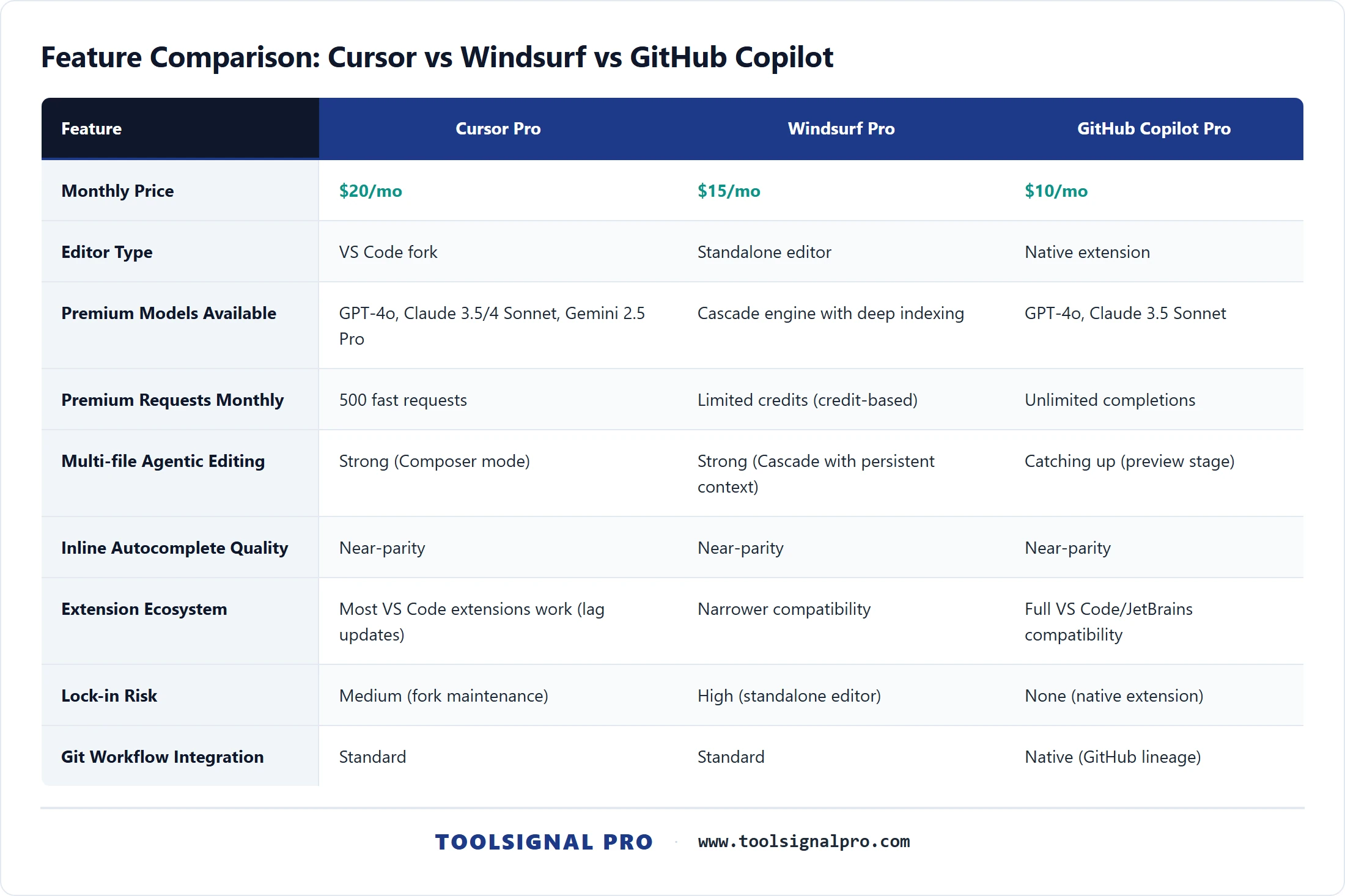
- Cursor Pro — $20/mo. VS Code fork. Access to GPT-4o, Claude 3.5/4 Sonnet, Gemini 2.5 Pro. 500 premium model requests/mo. Strong agentic task execution. Best for: solo devs who need multi-file refactoring and agent mode daily.
- Windsurf Pro — $15/mo. Standalone editor (formerly Codeium). Cascade agentic engine with deep codebase indexing. Unlimited autocomplete, limited premium credits. Best for: solo devs who want guided agentic flows at a lower price point.
- GitHub Copilot Pro — $10/mo. Native VS Code and JetBrains integration. GPT-4o and Claude 3.5 Sonnet access. Unlimited completions, agent mode in preview. Best for: solo devs already embedded in the GitHub ecosystem who want low-friction AI assist. Pricing verified at github.com/features/copilot.

Pricing Breakdown for Solo Developers
Cursor offers a free tier (2,000 completions, 50 premium requests/mo) and a Pro plan at $20/mo with 500 fast premium requests. Exceeding that limit downgrades you to slower models or costs additional credits — a hidden cost that heavy users on Reddit consistently flag. The Business tier at $40/seat/mo adds admin controls solo devs rarely need. Windsurf prices Pro at $15/mo with unlimited autocomplete and a credit-based system for premium model actions; the free tier is generous for light usage. Copilot remains the cheapest at $10/mo for Pro, with a free tier offering 2,000 completions and 50 chat messages monthly. Copilot Pro+ at $39/mo unlocks higher rate limits and access to newer models. For most solo devs doing 4-6 hours of daily coding, Cursor's 500 premium requests and Copilot's unlimited completions both cover typical workflows without overage anxiety. Windsurf sits in the middle — cheaper than Cursor, more agentic than base Copilot. Pricing sourced from cursor.com/pricing as of May 2026.

AI Coding Features That Actually Matter Solo
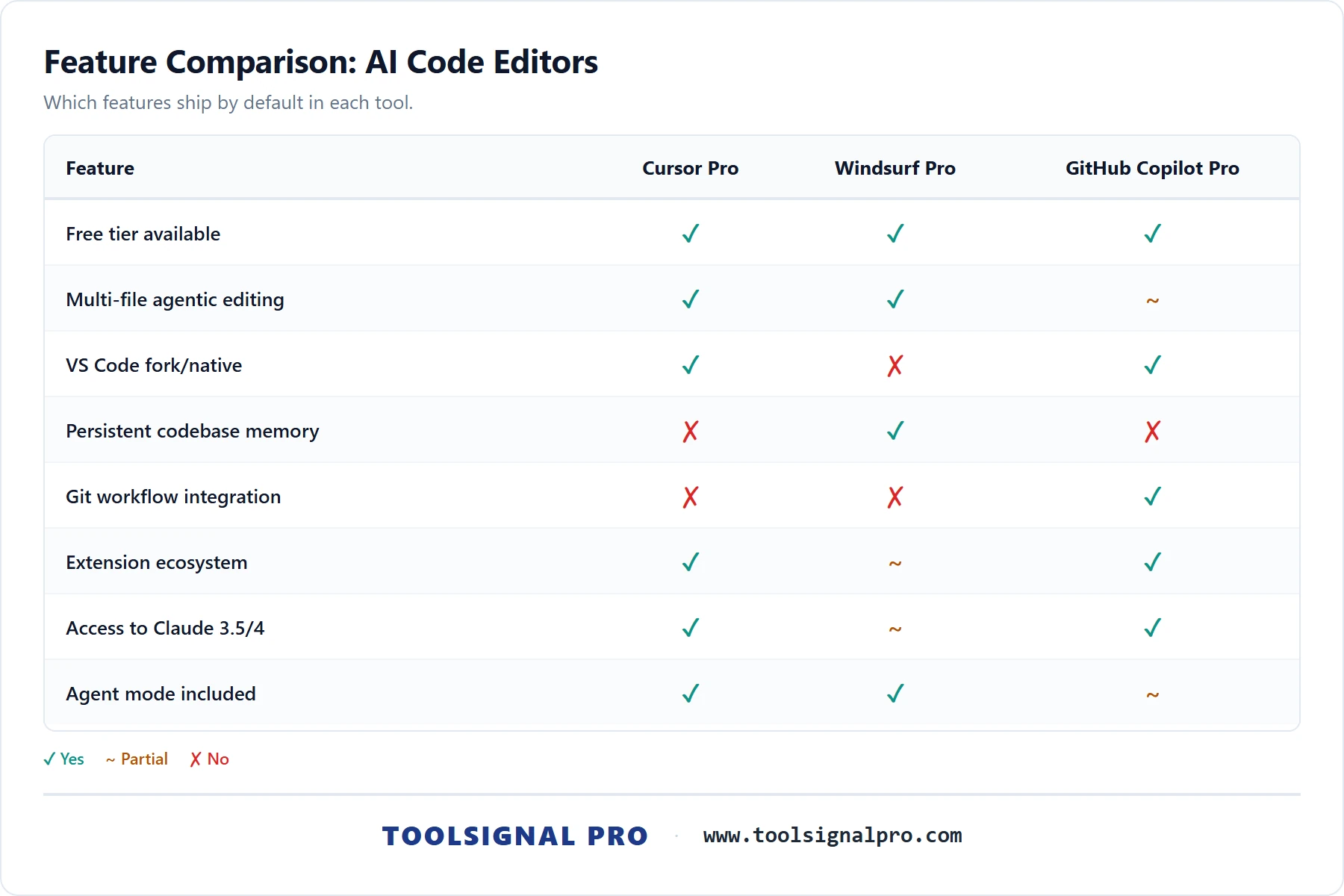
Multi-file context awareness is the differentiator solo devs feel most. Cursor's Composer and agent mode can read, plan across, and edit multiple files in a single operation — users on Hacker News and Reddit's r/cursor consistently cite this as the primary reason to pay $20/mo. Windsurf's Cascade engine approaches this differently, building a persistent context graph of your codebase that carries memory across sessions. Copilot's agent mode (available since early 2026) handles multi-file edits within VS Code but community feedback suggests it still trails Cursor's agentic depth for complex refactors. Inline autocomplete quality is near-parity across all three for single-line and block completions. The gap widens on agentic task execution — scaffolding a full feature, debugging across service boundaries, or running terminal commands autonomously — where Cursor leads, Windsurf follows closely, and Copilot is catching up fast with its agent mode iterations.
Editor Experience, Extensions, and Ecosystem Lock-In
Cursor forks VS Code, which means most extensions work — but updates lag behind official VS Code releases, and some extensions occasionally break. You're betting on Cursor's team to maintain parity. Windsurf runs its own standalone editor built on a VS Code base; extension compatibility is narrower, and switching away means re-establishing your entire workflow. Copilot has zero lock-in friction — it's a native extension inside VS Code or JetBrains, your settings and extensions stay untouched, and removing it takes one click. For solo devs who rely on specific VS Code extensions (Docker, database managers, language-specific tooling), Copilot's integration model carries the least risk. Git workflow integration also favors Copilot given its direct GitHub lineage — PR summaries, commit message generation, and issue-linked context come built in.
Final Verdict: The Best AI Code Editor for Solo Devs
For most solo developers in 2026, Cursor Pro is the strongest default pick. Its agentic multi-file editing, Composer workflow, and access to frontier models (Claude 4 Sonnet, GPT-4o, Gemini 2.5 Pro) deliver the highest productivity ceiling for developers shipping alone. The $20/mo price is justified if you use agent mode even a few times per week — each complex refactor it handles autonomously saves 30-60 minutes of manual work.
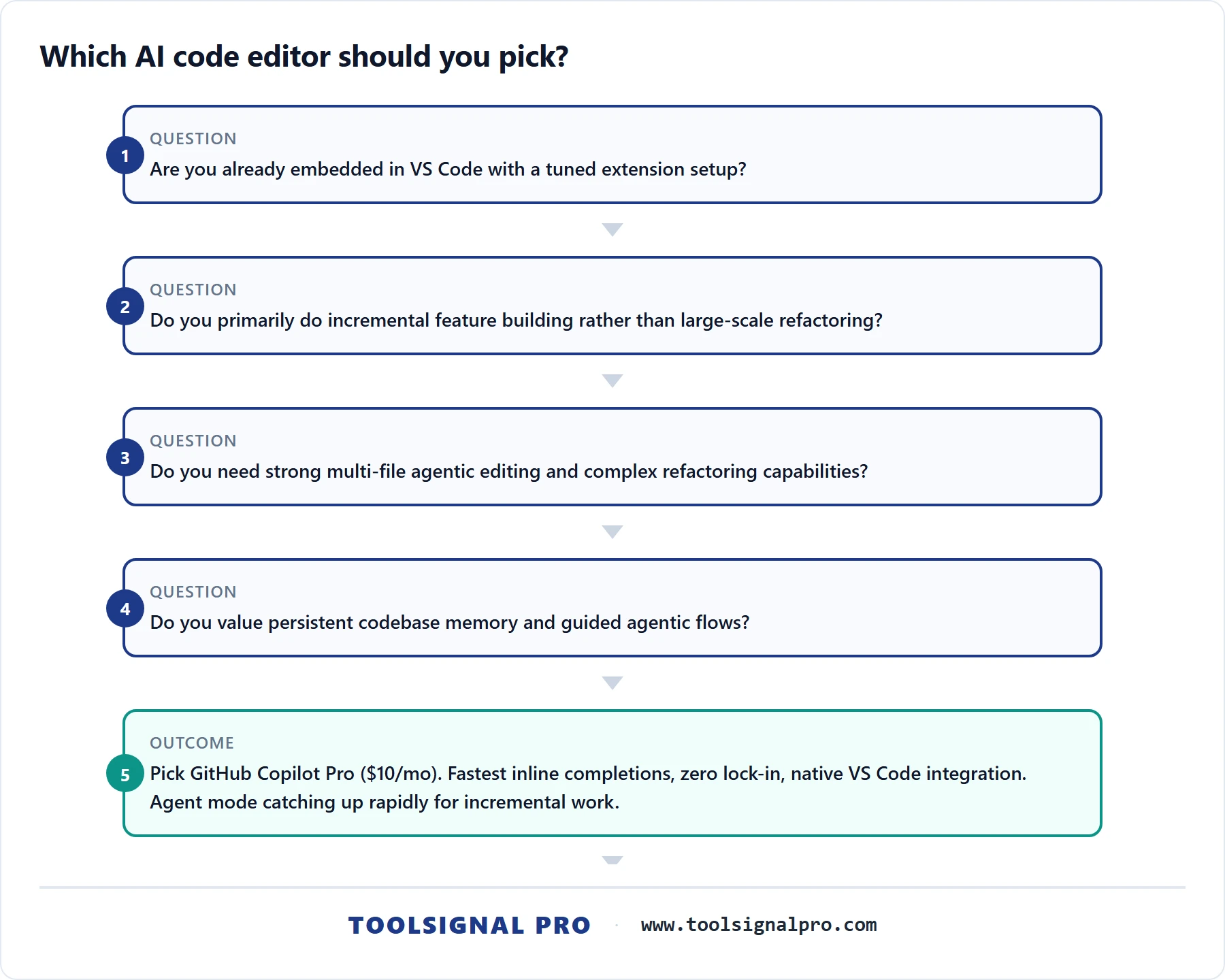
Choose GitHub Copilot Pro ($10/mo) if you're budget-conscious, already live inside VS Code with a tuned extension setup, and primarily need fast inline completions plus occasional chat. Copilot's agent mode is improving rapidly, and for solo devs whose work is mostly incremental feature building rather than large-scale refactoring, it covers 80% of needs at half the price. It's also the safest choice for ecosystem stability — no fork lag, no extension breakage, no lock-in. Choose Windsurf Pro ($15/mo) if you value persistent codebase memory and Cascade's guided agentic approach, and you're comfortable with a smaller extension ecosystem. Windsurf's OpenAI acquisition could accelerate its model access significantly through 2027, making it the dark horse worth watching. Before paying, verify one thing: run each tool's free tier on your actual codebase for a week. The quality of context-aware suggestions varies dramatically based on project size, language, and framework — and no benchmark replaces testing against your own code. Visit ToolSignal for detailed scoring and side-by-side breakdowns across all three editors.
Category Coverage Notice
This article follows our label-specific editorial criteria. Details: